
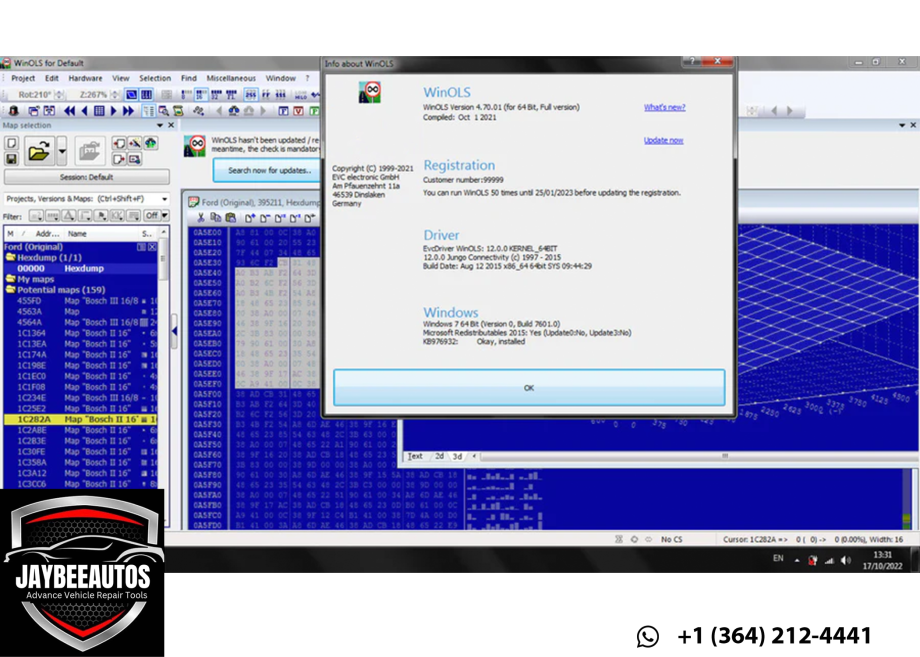
WinOLS 4.7.x (English) Engineering Workstation on VMware — For Licensed Users
Original price was: €100.00.€90.00Current price is: €90.00.
DESCRIPTION
WinOLS 4.7.x (English) Engineering Workstation on VMware — For Licensed Users
Deploy a professional ECU calibration workstation pre-configured on VMware for WinOLS 4.7.x and ECM Titanium 1.61—
optimized for stability, file management, and training.
Valid, official licenses are required for all commercial tools. We provide setup assistance, best-practice
configuration, and optional onboarding so you can focus on maps, not Windows housekeeping.
PDF quick-start & video walkthroughs • Optional 1-on-1 remote setup session
Not included: WinOLS/ECM Titanium licenses, dongles, or any activation codes. You must supply your own valid licenses.
Who This Is For
- Workshops and tuners who own WinOLS 4.7.x and/or ECM Titanium licenses and want a clean, stable VM to run them.
- Shops standardizing multiple bays with a repeatable, backup-friendly environment.
- New staff who need a ready-to-learn sandbox with structured map libraries and training materials.
VM Environment Highlights
- Windows OS pre-tuned (services trimmed, power plan, paging, temp paths) for smoother map editing and file search.
- Project templates for common ECUs (naming conventions, checksum notes, stage folders, backups).
- Clean drivers & runtimes (.NET, VC++ redists) verified to avoid plugin and checksum tool conflicts.
- Snapshot-ready baseline so you can roll back after tests or training sessions in seconds.
- File safety: default redirection of desktop/documents to shared host folder for easy backups.
Workflow Optimizations
- Curated folder structure (Originals / Stage1 / Stage2 / Hardware / Checksums / Logs) to keep projects tidy.
- Checksum notes and reminders (where to validate, typical pitfalls, when to re-calc after edits).
- Hex editor & diff tools pre-installed (freeware) for quick comparisons and byte-level sanity checks.
- Host–guest shared folders mapped for fast drag-and-drop from your flasher laptop to the VM.
What You’ll Receive
- VMware installer (Pro/Player as appropriate) + preconfigured VM image ready for your licensed tools.
- Step-by-step installation guide with screenshots (host requirements, import, first boot, snapshots).
- Setup checklist for WinOLS/ECM Titanium (adding your license/dongle, preferred directories, autosave, backups).
- Optional remote session: we help import the VM, connect dongles, and tune performance settings.
System Requirements
- Host OS: Windows 10/11 (recommended), macOS (with Fusion/Intel), or Linux with virtualization support.
- CPU: Modern Intel/AMD with virtualization (VT-x/AMD-V) enabled in BIOS.
- RAM: 16 GB minimum (32 GB recommended if multi-tasking with flash suites).
- Storage: 60–120 GB free SSD space for VM + projects; enable TRIM on SSD.
- Peripherals: USB ports for licensed dongles; stable power supply during flashing (use a regulated PSU).
We do not supply licenses, activations, or keygens. Customers must provide their own valid, official licenses for all commercial software.
We can assist with installation and workflow setup around your licensed tools and provide general training resources.
Setup Process
- Install VMware on your host, then import the VM we provide.
- Create an initial snapshot (“Clean Baseline”).
- Install your official WinOLS/ECM Titanium software/dongles inside the VM.
- Map shared folders to your project drive; test read/write.
- Optionally, run our performance script (disables unnecessary services, sets LargeSystemCache, etc.).
Why a VM for Tuning?
- Isolation: Keep your calibration environment clean and reproducible.
- Portability: Move the exact same setup to another machine by copying the VM.
- Rollback safety: If an update breaks something, revert to a stable snapshot.
- Team onboarding: New engineers can start from a known-good image in minutes.
Training & Support (Optional)
- Orientation call (30–60 min): project structure, naming, and backup habits that prevent data loss.
- Map editing basics (tool-agnostic): how to document changes, verify checksums externally, and keep an audit trail.
- Flashing hygiene: pre-flash validations, voltage stability, and post-flash verification.
What This Product Is Not
- It is not a software license or activation for WinOLS/ECM Titanium.
- It is not a cracked, patched, or “free” copy of any paid tool.
- It is not a promise of specific checksum or map packs.
Get a clean, stable calibration workstation — and use it with your official licenses for WinOLS/ECM Titanium.
Need help tailoring the VM for a specific ECU platform? We can pre-map folders and add free utilities that support your licensed workflow.
Contact:
jaybeeautos.com |
WhatsApp: +1 364 212 4441
COMMENTS
Only logged in customers who have purchased this product may leave a review.
Reviews
There are no reviews yet.