
ToyoLex 4 — Black Diamond Edition (BDE) 2024
Original price was: €120.00.€110.00Current price is: €110.00.
DESCRIPTION
ToyoLex 4 — Black Diamond Edition (BDE) 2024 ·
IMMO OFF via Flash File for Toyota/Lexus/Hino (N04)
The first dedicated application in the world built to disable immobilizer systems directly through the ECU flash file
on Toyota, Lexus, and Hino platforms. No wire cutting, no add-on boxes, no guesswork—just load your readout,
click IMMO OFF, and write the processed file back. Start and go.
Flash-File Based · No Wiring Mods
Works with Common Readers/Writers
DTC Auto-Erase Helper
Why ToyoLex 4 BDE?
- Purpose-built IMMO OFF engine that edits only the immobilizer block inside the flash memory—clean, precise, reproducible.
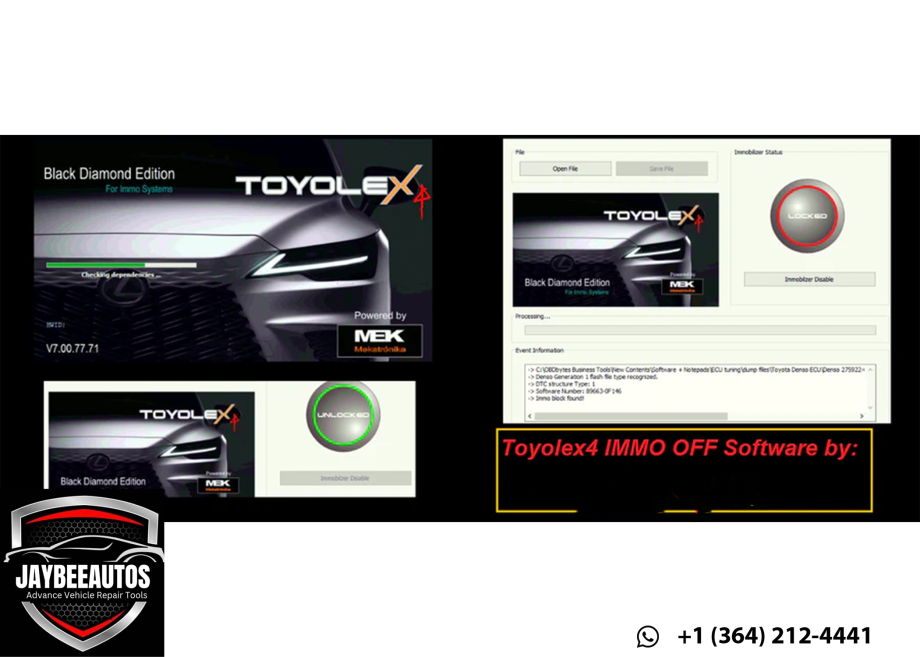
- One-click workflow: open file → detect platform → IMMO OFF → auto DTC cleanup (special function) → save → write back.
- No ECU opening in most cases: because the process targets flash content, many jobs can be handled via the OBD II port (depending on your reading/writing tool capabilities).
- No wiring changes: Stop cutting wires or removing modules. Program the file generated by ToyoLex 4 BDE, then start the engine.
- Diesel & gasoline coverage: supports flash files from all Denso ECUs for Toyota/Lexus diesel and gasoline engines; Hino N04 recognition included.
- Designed for safety: engineered to work with zero risk on Denso Gen 3 ECUs when used as intended and with correct tools.
- Wide tool compatibility: accepts binary files produced by popular ECU readers/writers that support Denso Toyota/Lexus/Hino ECUs.
- Real-world tested: validated on key blade and start/stop systems; clear warnings when a hybrid file is opened.
Supported Generations & MCU Cores
ToyoLex 4 BDE supports Denso Generation 1, 2, and 3 file structures for Toyota/Lexus, with specific MCU recognition as below:
Gen 3 (Denso)
- R7F701202
- R7F701216
Gen 2 (Denso)
- D76F0199GD
- D76F0196F1
- D76F0219F1
Gen 1 (Denso)
- NEC 76F00xx series
- Not supported: old 76F0004GD mask (seen on some 2001–2004 models)
How ToyoLex 4 BDE Achieves IMMO OFF
The application uses an exclusive algorithm to identify the immobilizer data block within the ECU flash file. It edits only that block, leaving all other calibration areas intact. By restricting changes to the flash region, ToyoLex 4 BDE enables workflows that can often be completed via OBD II (tool-dependent), avoiding risky PCB access or soldering. A built-in special function performs a companion DTC erase tailored to immobilizer disable, minimizing nuisance codes after re-write.
Key Advantages
- Flash-only edits → fewer physical risks
- OBD-centric workflow (where your tools allow)
- Automatic, consistent process per platform
- Built-in post-process DTC handling
Use Cases
- ECU swaps / lost keys IMMO lockout
- Workshop diagnostics, dyno/R&D scenarios
- Fleet operations requiring rapid turnaround
- Replacement ECUs needing quick commissioning
Five-Step Workflow
- Read the ECU using your preferred tool (OBD/bench/boot) to obtain the flash binary.
- Load the file in ToyoLex 4 BDE. The app detects generation/MCU and flags unsupported cases (e.g., hybrid, locked Gen3).
- Click IMMO OFF — the exclusive algorithm targets the immobilizer block only.
- Apply DTC helper — optional special function erases related immobilizer codes automatically.
- Write back the processed file to the ECU. Validate start and confirm no IMMO-related DTCs remain.
Compatibility, Limits & Notices
- Supported: Toyota/Lexus diesel & gasoline Denso ECUs (Gen 1/2/3), Hino N04-series recognition.
- Not Supported: Hybrid vehicles; locked Gen3 ECUs (damaged by prior wrong programming).
- Untested: Factory-virgin ECUs (never installed).
- Readers/Writers: Use any capable tool that produces a valid binary for the listed ECUs. OBD feasibility depends on your tool and the ECU.
- Systems: Verified on blade-key and start/stop platforms.
System Requirements
- OS: Windows 10/11 recommended (x64). Windows 7 x64 may work depending on drivers/frameworks installed.
- CPU/RAM: Modern 64-bit CPU; 8 GB RAM minimum (16 GB+ recommended).
- Storage: 1–2 GB free for app + working files.
- Permissions: Admin rights for install/activation.
- I/O Tools: External ECU reader/writer (OBD/bench/boot) not included.
What You Get
- ToyoLex 4 BDE (2024 build) — installer package (digital download)
- User Guide — step-by-step file processing overview and platform notes
- Support Access — assistance for installation/activation and basic usage
Licensing & Activation
- License Type: Single-workstation activation (additional seats available on request).
- Activation: Performed after purchase using our instructions (internet may be required during first activation).
- Rehost: Contact support if you replace hardware or need to move the license.
Frequently Asked Questions (FAQ)
1) Does ToyoLex 4 BDE modify the whole file?
No. It specifically targets the immobilizer block in the flash memory to keep other calibrations intact.
2) Can I complete IMMO OFF via OBD?
In many cases, yes—if your reading/writing tool supports OBD for that ECU. Otherwise, use bench/boot.
3) Are hybrids supported?
No. Hybrid ECUs are not supported. The app will warn you when a hybrid file is detected.
4) What about Gen3 ECUs?
Designed to work with zero risk when used correctly on Gen3 (supported MCUs). Locked Gen3 ECUs from bad prior programming are not supported.
5) Do I need to cut wires or remove modules?
No. Do not cut or uninstall anything. Process the flash file with ToyoLex 4 BDE, write it back, and start the engine.
6) Which engines are covered?
Diesel and gasoline Toyota/Lexus ECUs under Denso Gen1/2/3 file structures; Hino N04 recognition included. Coverage depends on the specific file/MCU pairing.
Compliance & Responsible Use
ToyoLex 4 BDE is a professional workshop tool. IMMO OFF may be regulated or prohibited in certain jurisdictions. You are solely responsible for
legal compliance, customer disclosures, and safe workshop practices. Always keep original backups, maintain stable power during read/write, and perform post-write safety checks.
Ordering, Delivery & Support
- Purchase: Add ToyoLex 4 BDE to cart and complete the secure checkout.
- Confirmation: After payment, send your Order Number and product name “ToyoLex 4 BDE IMMO OFF 2024” to our support.
- Delivery: Receive download links and activation instructions by email within 24 hours (digital product; no shipping).
- Assistance: We’ll help with installation/activation and basic usage questions.
Official Contact Details
Jaybee Auto Tuning
📧 Email: support@jaybeeautos.com
📱 WhatsApp: +48732100572
🌐 Website: www.jaybeeautos.com
Disclaimer: Model/engine names and trademarks are the property of their respective owners and are used for identification only.
Incorrect procedures can damage ECUs/vehicles—use qualified technicians and follow OEM repair manuals. Where required by law,
restore OEM configurations before public-road use.
COMMENTS
Only logged in customers who have purchased this product may leave a review.
Reviews
There are no reviews yet.