
GM VIN Change App (ELM327/J2534)
Original price was: €95.00.€75.00Current price is: €75.00.
DESCRIPTION
GM VIN Change App (ELM327/J2534)
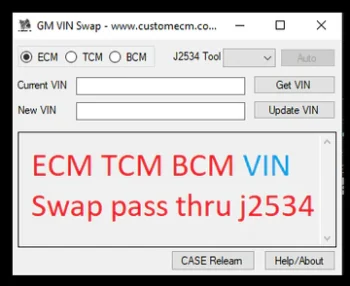
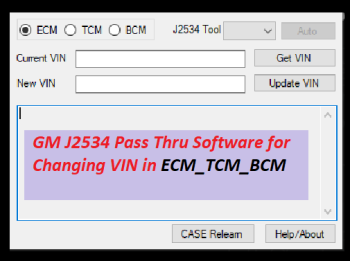
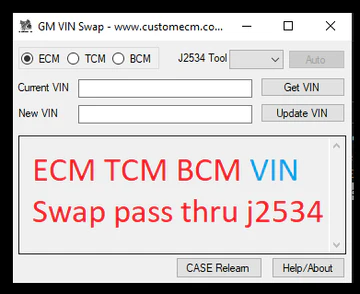
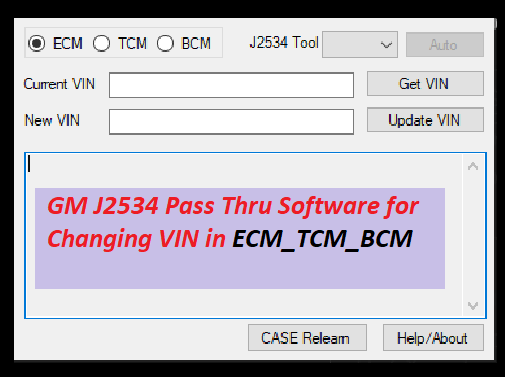
The GM VIN Change App is a practical software tool for reading and writing VIN data on GM vehicles. You use standard ELM327 interfaces or J2534 passthrough devices to perform VIN correction on supported ECUs. Workshops use this tool for module replacement, module pairing, and service tasks where a correct VIN entry is required for stable operation.
Key Functions
- Read VIN from engine, transmission, and body modules.
- Write a replacement VIN after module swap.
- Fix invalid, blank, or mismatched VIN entries.
- Support for ELM327 and J2534 devices.
- Direct communication with GM CAN platforms from 2006 to current models.
- Support for common service modules such as ECM, TCM, BCM, IPC, ABS, HVAC, and more.
- Fast VIN write process with confirmation output.
- No internet link needed once activated.
Supported Vehicles
The app supports GM vehicles built on CAN lines such as Chevrolet, GMC, Cadillac, and Buick models from 2006 upward. Typical workshop usage includes Silverado, Sierra, Tahoe, Suburban, Cruze, Malibu, Equinox, Terrain, ATS, CTS, and many others. Reports from technicians show stable VIN writing on E39, E78, E80, E90, E92, E98, E39A, T43, T87, BCM Global A, and BCM Global B units.
Technical Notes
- Supported interfaces: High quality ELM327 or J2534 passthrough tools.
- Communication line: HS CAN and MS CAN depending on module type.
- VIN write time: 10 to 25 seconds for most modules.
- Error handling: The tool identifies blocked modules and gives guidance for recovery or reset.
Who Uses This Tool
Auto electricians, locksmiths, module repair shops, chip tuners, and mobile technicians use the GM VIN Change App when a module from another vehicle must be adapted. A correct VIN entry avoids DTCs during diagnosis, prevents immobilizer lockouts on some platforms, and ensures smooth service operations after part replacement.
Benefits for Your Workshop
- Faster module pairing during repair jobs.
- Lower return rates after ECM or BCM replacement.
- Reliable VIN write process with clear logs.
- Support for common GM powertrain and body modules.
Package Includes
- GM VIN Change App software file.
- Activation instructions.
- Quick start guide for ELM327 and J2534 tools.
Installation Steps
- Install the software on your Windows PC.
- Connect your ELM327 or J2534 interface.
- Select the module from the app list.
- Read the current VIN.
- Enter the replacement VIN.
- Write and confirm the change.
Contact
Website: jaybeeautos.com
WhatsApp: +13642124441
COMMENTS
Customer Testimonials

Michael Thompson • USA
Used this app to change VIN on a Silverado BCM. Smooth process, no errors, very reliable.
Oliver Meyer • Germany
Fast VIN correction on multiple ECUs. ELM327 interface worked perfectly with the app.
David Brown • USA
Changed VIN on TCM and IPC modules in under 15 seconds each. Clear instructions and logs.
Sophia Wagner • GermanyWorked on multiple Chevrolet models. The app handled BCM and ECM modules reliably.
Jonathan Carter • USA
VIN changes for module replacement went perfectly. The software is intuitive and stable.
Anders Hansen • Denmark
Reliable tool for workshops. Saved time when adapting new modules to GM vehicles.
Mark Williams • USA
All VIN edits succeeded on Silverado, Tahoe, and Suburban modules. App is stable and fast.
Emma Rossi • Italy
Simple VIN write for TCM and BCM modules. Easy to follow steps and clear logs.
Only logged in customers who have purchased this product may leave a review.
Reviews
There are no reviews yet.